OctoSniff 5.0 — Built from Scratch in C++, New Dashboard & Traffic Control
 OctoSniff Team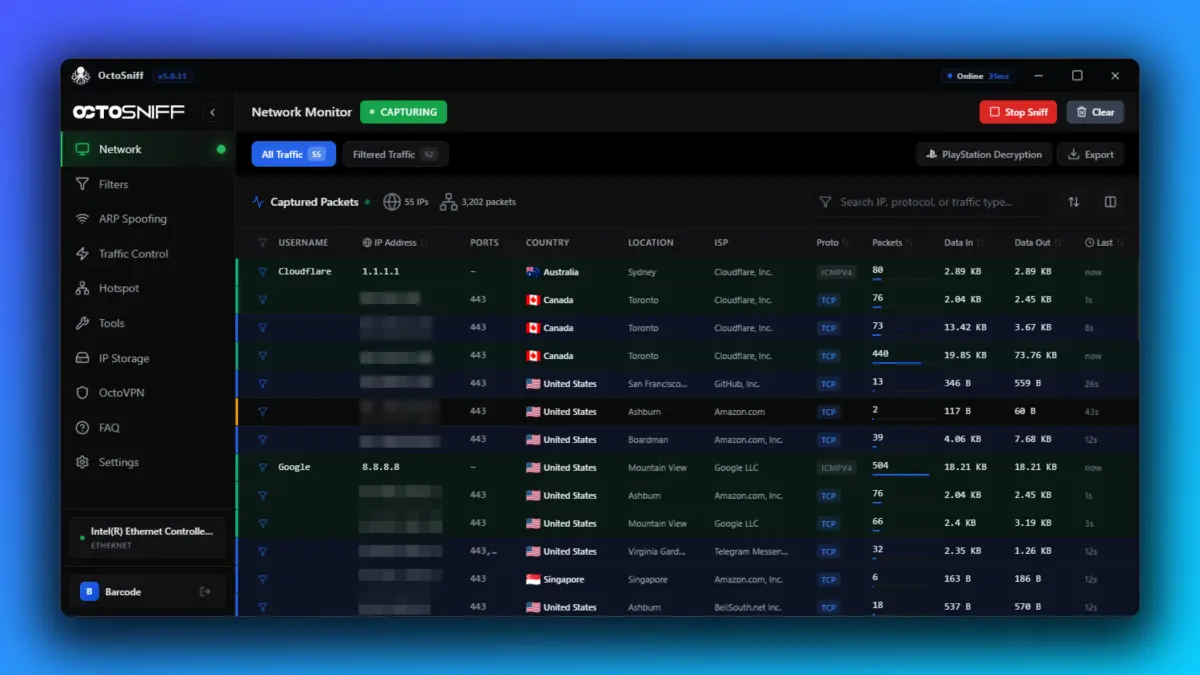
After 11 years of building, breaking, and refining the most trusted IP sniffer in the gaming community, we're proud to announce OctoSniff 5.0 — the biggest release in our history. Every line of code has been rewritten from the ground up in C++ for raw performance, paired with a completely redesigned dashboard and the introduction of Traffic Control, our advanced lag switch engine.
Rewritten from Scratch in C++
OctoSniff 5.0 isn't an update — it's a new product. The entire application has been rebuilt in C++ to deliver the performance that serious network analysis demands. Packet capture is faster. Filters execute in microseconds. Memory usage is a fraction of what it was. Everything feels instant.
We made this decision because, after a decade of pushing our previous architecture to its limits, we knew a rewrite was the only way to achieve the speed and reliability our users deserve. C++ gives us direct hardware access, zero-overhead abstractions, and the ability to squeeze every last drop of performance out of your machine.
A Brand New Dashboard
The dashboard has been completely redesigned with clarity and speed in mind. Whether you're monitoring live sessions, managing your filters, or configuring Traffic Control rules, the new interface puts everything at your fingertips with zero clutter.
Key dashboard improvements include:
- Real-time packet visualization — see connections form and dissolve live
- One-click filter management — apply, edit, or stack filters instantly
- Integrated Traffic Control panel — manage lag rules without switching windows
- Cleaner session overview — player IPs, usernames, and geo data at a glance
- Dark-first design — built for long sessions with reduced eye strain
Introducing Traffic Control
Traffic Control is our most ambitious feature yet — an advanced lag switch built on 11 years of networking experience, completely reinvented from scratch.
Traditional lag switches are blunt instruments. They either block all traffic on a port or they don't. Traffic Control is different. It features deep packet inspection (DPI), which means you can target specific game packets rather than just filtering by port and protocol. This is a game-changer for titles like Red Dead Redemption Online, GTA Online, and other competitive games where precision lag gives you a tactical advantage.
Deep Packet Inspection
Target specific game packets instead of all traffic on a port. Surgical precision.
Rule-Based Filtering
Drop, delay, throttle, reorder, or duplicate packets with granular rule-based controls.
Burst Scheduling
Configure probability and burst timing per rule for natural, undetectable lag patterns.
Device-Level Targeting
Apply rules to specific devices on your network — consoles, PCs, or phones individually.
Perfect for Competitive Gaming
Traffic Control was designed with competitive scenarios in mind. In games like GTA Online and Red Dead Redemption, lag manipulation can be the difference between dominating a lobby and getting wiped. With deep packet inspection, you're not blindly throttling your connection — you're surgically targeting the exact game traffic that matters, while keeping voice chat, downloads, and other traffic untouched.
Other games where Traffic Control shines:
- GTA Online — solo public lobbies, heist advantages
- Red Dead Redemption Online — PvP and free roam control
- Call of Duty — host manipulation in peer-to-peer matches
- FIFA / EA FC — delayed input windows for competitive edge
- Any peer-to-peer game where connection quality affects outcomes
Packet Tester — Craft, Send & Replay
OctoSniff 5.0 introduces Packet Tester, a built-in packet generation tool that lets you craft custom packets from scratch and send them to any IP address. Define headers, payloads, protocols, and ports — then fire at will.
But generation is only half the story. Packet Tester also supports replay: capture a packet during a live session, then re-send it later with modified parameters. This is invaluable for debugging game networking, testing firewall rules, stress-testing connections, or understanding how a game's netcode responds to specific packet structures.
Custom Packet Builder
Define protocol, headers, payload, source and destination — full control over every byte.
Packet Replay
Capture packets from live sessions and replay them with original or modified parameters.
Stress Testing
Send packets in bursts to test how connections and firewalls respond under load.
Edit & Resend
Modify any captured packet on the fly — tweak payloads, swap IPs, and send instantly.
Packet Inspector Mode
For those who want to go deeper, Packet Inspector Mode gives you a raw, unfiltered look at every packet flowing through your network. View hex dumps, decode protocol headers, inspect payloads byte-by-byte, and understand exactly what data is being exchanged between your machine and the game servers.
Combined with the Packet Tester, our built-in nmap network scanner, Traffic Control, and the ARP scanner, OctoSniff 5.0 gives you a complete network analysis toolkit in a single application. No need to juggle Wireshark, nmap, and a dozen other tools — everything you need is integrated, purpose-built, and designed for speed.
What's Next
OctoSniff 5.0 is just the beginning of this new chapter. Here's what's on the roadmap:
- macOS support — the C++ rewrite makes this possible; coming soon
- Cloud filter improvements — faster updates, more game coverage
- Traffic Control templates — community-shared rule presets for popular games
Ready to upgrade?
OctoSniff 5.0 is available now. Existing license holders get the update free. New to OctoSniff? Get started for just $19.99.